






Photoshop work
Blog › Forums › Photography › Photoshop work
- This topic has 23 replies, 10 voices, and was last updated Sep 11, 2007 at 7:58 pm by
Carter Simcoe.
-
AuthorPosts
-
Aug 29, 2007 at 3:41 pm #7365
yuhina
MemberHi Friends,
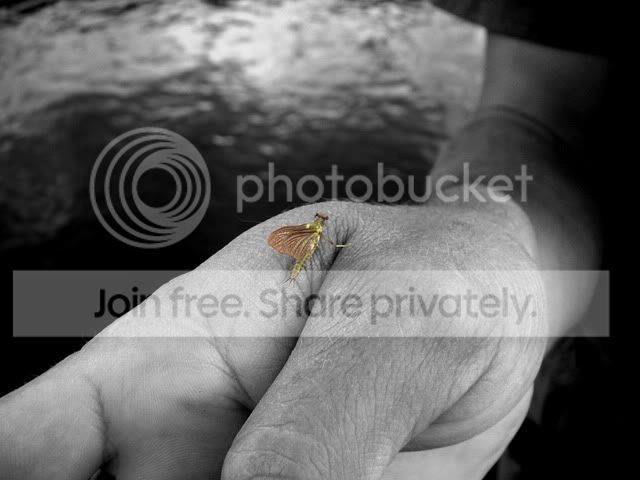
Usually I am not a big fan of photoshop effect… I am not a purist, just like the style “what it is…”
So, I usually use photoshop for transfer color picture to B/W or just adjust the size or color temperature…
I remember there is one photographer was famous in his COLORED B/W pictures…can not remember his name at this moment (he has a photo albumn about Tibet…)… but anyway, I have done some family pictures by using his concept before, just retain the skin coloration and make the rest of the background to be mono tone. Recently, I sent my fishing buddy, Bryan, a picture from our fishing trip in the West… a green drake bug. Surprisingly, he use the same skill to enlight the bug itself. I though it is a very interesting picture… just want to share this with you :). Sincerely, Mark
 Aug 29, 2007 at 5:02 pm #61776
Zach Matthews
The Itinerant AnglerThat is a pretty gripping picture.
Aug 29, 2007 at 5:07 pm #61777The Itinerant AnglerHere are a few that I have played with before.
Aug 29, 2007 at 5:36 pm #61778Richard Bernabe
MemberThat is a pretty gripping picture.
Aug 29, 2007 at 6:10 pm #61779MemberThe photographer I mentioned above, Phil Borges http://www.philborges.com/tibet/tibetan-portrait.html
nice works… Zach…Well said! Richard, it’s all about the limit of imagination!
The TSE lens are so nice…I always want to try it in the landscape shot…BTW, love the redfish tail…very impressive : )Aug 29, 2007 at 6:24 pm #61780The Itinerant AnglerHey Richard –
I’m only familiar with shifting and tilting lenses in the perspective-control line Nikon sells to architectural photographers.
Aug 29, 2007 at 6:31 pm #61781Carter Simcoe
Memberfirst off that’s a good picture.
second, this could be one of the best topics discussed here in a while.
I’ve been doing a lot of B&W conversions lately and have also been adding some other layers to them in photoshop as well, it’s been a lot of fun.
Aug 29, 2007 at 7:47 pm #61782MemberThat image is too small for me to tell what is going on there. Everything you mentioned can be done in PS but the effect is not the same. A vignette, for example, created in PS is different than a mechanical vignette. A mechanical vignette is created when the image circle is smaller than the rectangular size of the image format. LF photographers are obsessed with image circles and usually the larger the better to avoid vignetting. By tilting or shifting too much, vignetting can also occur, unless the lens has a very large image circle. The effect is easy to pick out, usually.
Tilt is a huge advantage with non-fixed lenses. With an SLR, the lens plane and sensor plane are always the same and the effect you desire is created in PS with selectively placed gaussian blur, i am guessing. With a LF camera, you can keep the film plane at a 90-degree angle to the ground but tilt the lens plane backwards (for an example). That creates a very shallow DOF that runs horizontally through the frame while the upper and lower areas of the image are wildly OOF. Landscape photographers use this to their advantage by tilting the lens forward while leaving the film plane unchanged, thus changing the focal plane and getting more of the image in focus, near to far, without resorting to DOF and stopping down to a smaller aperture.
The image you have shown looks like it was focused on the angler, then “swing” was applied (same as tilt except swing is horizontal and tilt is vertical) throwing both the left and right sides OOF while keeping the angler in focus, as well as everything at the same distance in a narrow vertical focal plane.
Its too small for me to discern, but the effect is difficult to duplicate well in PS.
Aug 29, 2007 at 8:32 pm #61783MemberThat is great explaination, Richard!
To my knowledge, I have seen some portrait photographer use TSE lens for tilting in model shooting (Canon TSE 45 / 90mm) (note: I have not done that by myself). The most prominent effect to me were the control the depth of the field. It seems they can push the shallow DOF even shallower (opposite of landscape adjustment)… and also creating the exaggeration in the wide angle lens like TSE 24mm. (not very sure…just my guessing) MarkAug 29, 2007 at 8:35 pm #61784The Itinerant AnglerI now think you’re right, Richard.
Aug 29, 2007 at 9:04 pm #61785matt boutet
MemberZach,
Aug 29, 2007 at 9:12 pm #61786MemberSome of those images are definitely LF, but not all. The image of the woman wading into the pool is a perfect example – the trees in the background are all at about the same distance, but the ones in the center of the frame are in focus, yet to the left and right are not. No doubt that swing was applied.
Also look at these two site for some examples:
http://www.marchesiphoto.com
http://www.andyandersonphoto.comI worked with Andy Anderson on a few projects and he uses 4×5, 8×10 and some medium format as well – or he did, maybe he is digital now, I don’t know.
Aug 30, 2007 at 3:21 am #61787MemberWow…several great websites….
There are lot’s of great information here… thank you all..As far as I know… Nikon only have the new 85mm PC out lately. The 28mm/3.5;
Aug 30, 2007 at 8:53 am #61788MemberI own the Canon 24mm and 45mm TSE lenses and they, with the 90mm as well, both have all the movements of a view camera. From what I understand, the so does the Nikon 85mm PC lens. The older 28mm and 35mm PC lenses only have shift (and rise/fall) but not tilt/swing.
In addition to all of the advantages of perspective control and tilt/swing that come with lens movements, one unexpected benefit was the ease of making stitched panos with these lenses. With the shift or rise/fall movements, you can take three different frames without even moving the camera. Shift the lens to the far left – take an exposure, shift to the center – click, shift to the right – click. Stitch the three efforts together and you have a seamless pano because the camera never moved – only the lens.
Aug 30, 2007 at 4:08 pm #61789david king
MemberThis guy must be cinematographer. I would guess he is using a Harrison & Harrison or Tiffen filter for the effect. My other guess would be a Lensbaby.
David KingAug 31, 2007 at 6:41 pm #61790Philip Smith
MemberI’m not worthy, I’m not worthy!!!!!!!! Those are great shots.
Richard, et. al. you guys might as well be talking African Bushman, I don’t know anything about photography technicalities and jargon, nor do I own any nice equipment. But I love taking photos and like Zach, when the going isn’t going enough, I resort to photoshop for something to do.


 Aug 31, 2007 at 7:44 pm #61791Member
Phillip,
I like your artistic Photoshop interpretations, but you REALLY need to clean your camera’s image sensor. Email or PM me if you have any questions on how to do this.
Sep 1, 2007 at 12:25 am #61792anonymous
MemberZach-
some of the edge effects/frame effects in Tibor’s work may be polaroid neg. ( they made a 180 that was basically with a couple of tweaks a small view camera that used polaroid film that made a pos and neg at the same time) or PS versions thereof. Robert Frank really exploited that process way back, using the
Sep 1, 2007 at 1:41 pm #61793Member… I love taking photos and like Zach, when the going isn’t going enough, I resort to photoshop for something to do.
Well said! Philip…
It’s all about FUN! good works too.
Sep 3, 2007 at 2:13 pm #61794 Ben CochranMember
Phillip,
I like your artistic Photoshop interpretations, but you REALLY need to clean your camera’s image sensor. Email or PM me if you have any questions on how to do this.
Richard, I have always admired your work and now I admire the man even more! I know that you are extremely busy and that forces me to respect this reply of yours to Phillip even more 🙂
On the topic of photoshop, I will say that I am in love with that software! :)… I really enjoy the images posted on here and the effects really do add a very plesant feel to the images. It is amazing what can be done in that software and the best part is, the final image can feel believable. I attached one of the non believable types below but it is an example of another side of photoshops potential as an aid to desired final images.. This is a book cover that my girlfriend and I did for a publisher in Europe… The glass is not real and was created in CS3 so, 6 total photographs were used for the final image. It is kind of sad to say, as a lifestyle benchmark, but we had the greatest time on this assignment while sitting in front of PS for far to many hours lol…
-
AuthorPosts
- You must be logged in to reply to this topic.