






Help with Fly Pictures
Blog › Forums › Photography › Help with Fly Pictures
- This topic has 12 replies, 5 voices, and was last updated Dec 17, 2008 at 2:12 pm by
keith b.
-
AuthorPosts
-
Dec 16, 2008 at 12:03 pm #7854
keith b
MemberI am not a photog and am not trying to become one, but I would like to know how to take better pictures of my finished products.
I just read the post Mike put on about the RAB, and the shots in the step by step were great.
here is what I do, have, and my pictures turn out with shadows.
I pull my halogen lamp over the vise and get it pretty close to the fly, I hold some type of paper, usually white, and try to snap the picture.
Are there certain colors that work best behind the fly? DO you mount the background on something?
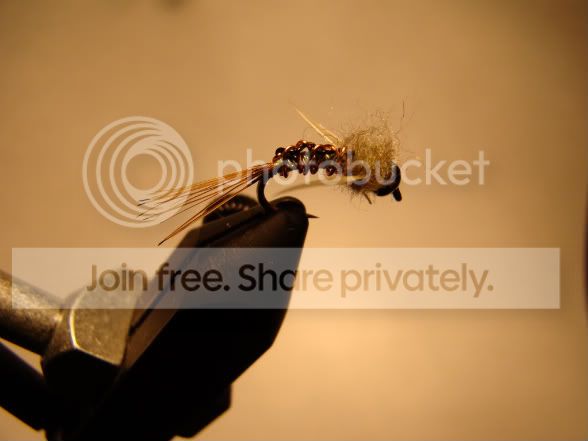
here is an example of my attempt. I use the macro on my advanced point and shoot Sony. It is a 9.1 mp and 15x zoom, i think it is a d70.thanks
Dec 16, 2008 at 4:19 pm #65912olle bulder
MemberTry to put a white paper or other reflective material underneath your fly so the light can bounce up into the shadow part.
Best is (if possible ofcourse) to use multiple light sources, like 2 halogen lights from both sides.
When i shoot pictures with the fly in my vice i tape the background to a box or somthing to hold it up. That way when you make a step by step the background looks the same on all pictures and you got both youre hands free.
Dec 16, 2008 at 5:20 pm #65913MemberOk thanks for the advice.
Dec 16, 2008 at 6:38 pm #65914MemberOk thanks for the advice. I will see what I can do. Any suggestions on reflective material?
The white foam material ,just like the stuff computers a protected with when they are in the box. Sorry cant come up with the material name in english.
Would aluminum foil work?
Maybe, i never used it because it does not diffuse the light.
I am just trying to think of what I have around the house.
The paper in the picture, above, it white, and I used the flash.Try not to use the flash direct on the fly it will always put more light above the fly then underneath. Try in youre setup to reflect the light from the lamp so you get almost the same amount of light underneath the fly.
Dec 16, 2008 at 7:04 pm #65915Daryl Human
MemberIt may be a little too in-depth for what you are trying to achieve, but a good read for some valuable info is the “Onstream Macro” thread.
Neal and some of the other guys went into quite some detail of how to accomplish the kind of shots you are after.Dec 16, 2008 at 7:20 pm #65916MemberDaryl youre link directs to the reply section of that thread.
It s a good thread to read Keith. Link
Dec 16, 2008 at 8:12 pm #65917MemberThanks, fixed now!
Dec 16, 2008 at 8:31 pm #65918john michael white
MemberKeith,
Have you checked/experimented with your white balance settings on your camera?
Dec 17, 2008 at 11:58 am #65919MemberJohn,
You may be getting to the edge of my understanding of my camera with that comment or question 😕
I will look into the WB.To the other comments, thank you.
Dec 17, 2008 at 12:21 pm #65920Neal Osborn
MemberKeith,
Please PM me the exact model of your camera. I need to look at the owner’s manual in order to answer your question.
Basically, you are experiencing the “Most Common” problem with fly pictures taken with a point and shoot camera. It is the brown/yellow dark shadow shot – very often seen with your setup. This is caused by the auto metering in your camera in the ambient light setting (your camera is basically metering your room light and bench hot light).
However, you mentioned that your camera was an advanced point/shoot at 9.1 mgpix. Let me know if this picture below is your camera because that could change everything and we might be able to help you override your auto metering settings. I see a little adjustable knob at the top of that camera and that usually translates to the ability to tweak the internal settings.
Dec 17, 2008 at 1:11 pm #65921MemberThat is the camera!
Dec 17, 2008 at 1:47 pm #65922MemberNice Camera Keith!
Dec 17, 2008 at 2:12 pm #65923Membermy wife is about to hate me Neal ;D
I am excited to learn more about the camera.
Thanks -
AuthorPosts
- You must be logged in to reply to this topic.