






Fun with Tilt/Shift Effect
Blog › Forums › Photography › Fun with Tilt/Shift Effect
- This topic has 7 replies, 4 voices, and was last updated Feb 3, 2014 at 5:37 pm by
Brad Eaton.
-
AuthorPosts
-
Jan 15, 2014 at 10:53 am #75986
Zach Matthews
The Itinerant AnglerHey guys –
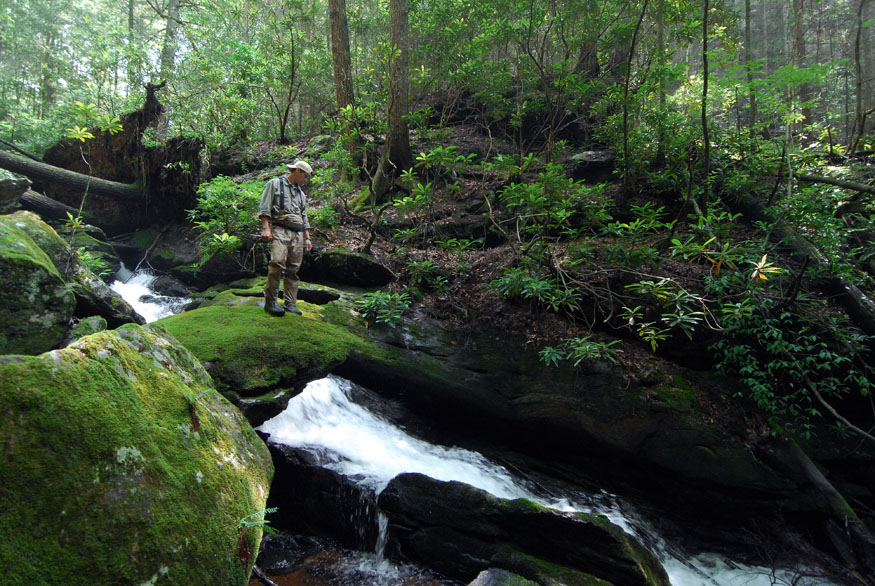
I saw a European photographer post a very cool fly fishing shot using a tilt/shift effect the other day, and I decided to figure out how he did it. Here is a pretty good primer:
http://mashable.com/2013/09/24/photoshop-tilt-shift/
Here’s the end result:
A versus B:

Here’s another one:
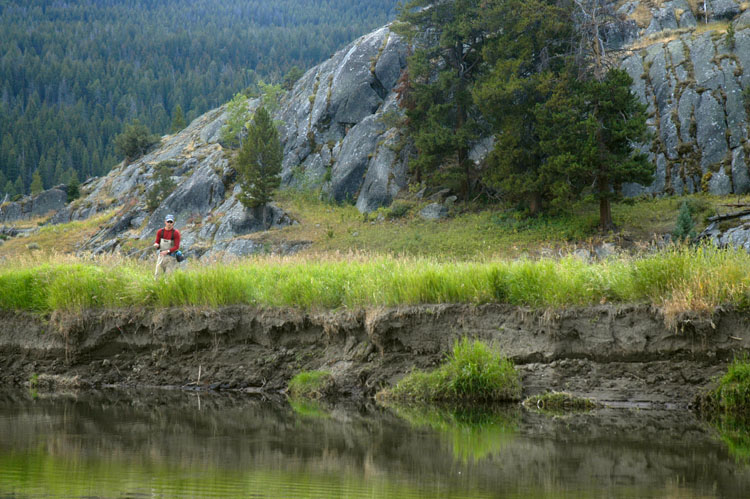

I like it personally. It seems to have the most impact with really wide angle shots and a lot of depth of field going back to a deep horizon. I’m also throwing a vignette on here.
One thing I would note that the article doesn’t: getting the gradient overlay in Quickmask mode is easy, but on its default setting the gradient itself is blurry enough that it will overlap to the point that it almost touches in the middle, thus blurring the top and bottom of the angler’s head and feet (or whatever object you’re trying to highlight). To avoid this open up the gradient mask controls by double clicking the “color slider” area in the upper left hand corner of the screen. Once there, you want to bring the two bottom sliders, which affect the alpha blur, closer together towards the middle. This will create a starker line between blurred and unblurred areas at the top and bottom of the screen, but conversely this will keep the section in the middle that you are trying to AVOID blurring from getting caught in the edges of the two blurry sections.
Zach
Jan 26, 2014 at 3:25 pm #76113 David AndersonMember
Nice work Zach.
The effect is great for isolating subjects in a landscape.
The digital versions look very good and I bet are a far simpler (and cheeper!) process than shooting them from scratch.I sold all my tilts when I switched to Nikon from Canon and now I miss them.
🙁www.dsaphoto.com
A picture is thousand words that takes less than a second while a thousand words is a picture that takes a month.
Jan 29, 2014 at 4:55 pm #76136 J A Y M O R RMember
Good stuff Zach. I have experimented with it a bit. A series of shots using tilt shift last season…a fun effect at times.

 Jan 29, 2014 at 6:52 pm #76137David AndersonMember
Here’s some samples from various Canon tilt lenses –



www.dsaphoto.com
A picture is thousand words that takes less than a second while a thousand words is a picture that takes a month.
Jan 30, 2014 at 9:04 am #76140The Itinerant AnglerInteresting to see the real thing. Thanks David. The effect really works best with a whole lot of depth in the frame, doesn’t it? With close in shots it just ends up looking like a focusing blur, sort of a kind of vignette as it were. The ‘model train’ effect only really happens with the really deep shots.
Cool guys.
Zach
Jan 30, 2014 at 3:27 pm #76141Brad Eaton
MemberI was able to borrow a 24mm T/S and had fun shooting with it.
We were up in MI for my buddies first steelhead fly fishing trip.


Brad
Jan 31, 2014 at 12:41 am #76142David AndersonMemberNice shots Brad – in particular the middle one.
Zach, the effect with a tilt lens is maybe a little more subtle than a post effect.
It’s certainly hit & miss shooting with one.www.dsaphoto.com
A picture is thousand words that takes less than a second while a thousand words is a picture that takes a month.
Feb 3, 2014 at 5:37 pm #76171MemberThanks David.
I’m finding that each time I use the T/S I get a few more shots to work out than before. I had a lot that were just off, making the subject out of focus. A fun lens for trial and error and can create some good results.
-
AuthorPosts


- You must be logged in to reply to this topic.