Hey guys –
Thanks to Gael Bataille for this tip.
We have had quite a few comments on the podcast in the iTunes Store, and I am very appreciative of those. Comment numbers have a lot to do with the relative ranks of the podcasts, and having lots of comments helps keep the show visible on the main page of the iTunes Outdoor section (my category).
However, as Gael points out, in order to comment on the Podcast, you need an iTunes account. No big deal – just register right? Well, actually, most of the time iTunes makes you give a credit card.
But Gael found a work-around.
In order to create an iTunes account without a credit card, simply open up iTunes and go to the “App Store” (link is on the main page on the upper left). This store allows you to download applications for an iPhone or iPod (but you don’t need one of those to make this work).
Simply find a free application (there is a Top Free Apps chart on the right hand side of the main page of the App Store). Click the free app, as though you were going to download it. You’ll need to push ‘Get App’ on the application’s page. A pop-up will come up. Click Create Account.
Ordinarily, this is where you’d need your credit card. But, since the App you’re trying to download is actually free, the store will let you create your account without a credit card.
Armed with your new iTunes account, you’ll be able to comment on my podcast (and on any other shows you choose to download).
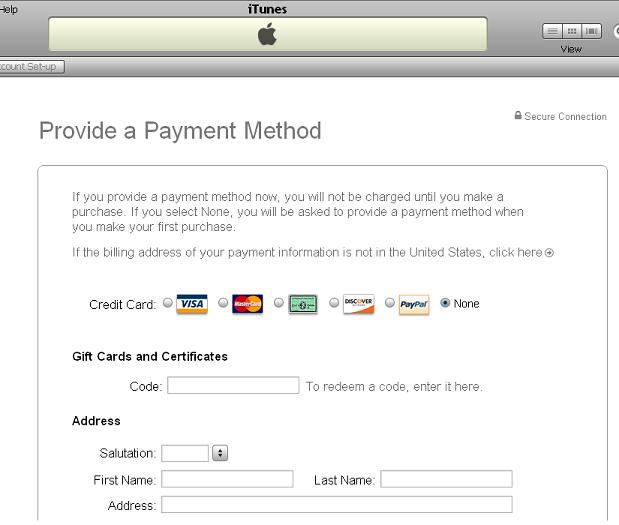
When you get to the credit card selection screen (after registering your name and email), you’ll now have a ‘None’ option, which will enable you to register without divulging any personal information.
Thanks Gael!
Zach







 .
.

