






Big Light, Small Subjects
Blog › Forums › Photography › Big Light, Small Subjects
- This topic has 21 replies, 7 voices, and was last updated Nov 7, 2009 at 2:40 am by
anonymous.
-
AuthorPosts
-
Oct 27, 2009 at 3:49 pm #8202
Neal Osborn
MemberI have posted a few recent Fly Art shots for ya’ll. These were captured in the new macro studio with dynamic lighting.
My primary goal in posting these pictures is to ask a favor. If you are a photog that understands color space management, please let me know how these RGB ICC profiles show up on your computer and let me know if it’s a PC or Mac/Apple or Wide Gamut monitor. For some reason, my web processed jpg’s have been off since upgrading to Snow Leopard. The following images are acceptable on a few PC’s at work and specifically the saturation in the red channel is perfect. However, on my older Mac running Leopord (not Snow Leopard) the red channel is blown and over saturated. If you don’t mind, please let me know how the red and orange colors look on your monitor and if the images appear over-saturated or dark in the midtones (not the shadows). Thanks in advance.
The red San Juan worm is the primary problem child in this set (as expected with a solid red subject). It shows up well on non-ICC profile corrected web browsers like IE7 but is blown on ICC corrected browser Safari on Snow Leopard..


 Oct 27, 2009 at 4:26 pm #69256
Douglas Barnes
MemberNeal,
These look fantastic on my PC run ViewSonic CRT monitor. Good separation in the reds and nothing blown out. Even the penny is spot on!
Perhaps a tiny color chart would be the ticket…hmmm…do I smell a digital bidness opportunity?
Oct 27, 2009 at 9:58 pm #69257john michael white
MemberNeal, those are some cool shots! On my work computer, which is a PC, they look great. This computer is pretty much stock. I’ll try and take a look when I get home on my home PC that has been calibrated, and see how they look there.
Update: As best I can tell, it looks fine on my PC screen at home.
Oct 27, 2009 at 11:28 pm #69258 David AndersonMember
Nice light – it brings out great detail and depth.
I have a MAc 17′ with the wide gamut matt screen that’s calibrated within an inch of it’s life.
The color looks good, though your reds are leaning to magenta as opposed to green – from raw a tweek in the red of -3 would be my gues to fix it.
Also, I would knock the saturation back in the yellow and red just a touch (-2?) to stop the color burning out.My question – how do I get a dozen of fly #4 ?
www.dsaphoto.com
A picture is thousand words that takes less than a second while a thousand words is a picture that takes a month.
Oct 28, 2009 at 1:28 am #69259MemberThanks for the feedback guys, that really helps.
Oct 28, 2009 at 1:31 am #69260MemberNeal, those new images you just posted look awesome, and the color looks great.
Oct 28, 2009 at 6:12 am #69261David AndersonMemberNice Neal, the deep red in that last fly looks perfect.
I don’t know if you have one, but I like these small color cards for keeping color in product shots under control – you just do a control frame when you have your exposure where you want it and then batch color correct everything off that frame.
Works well.
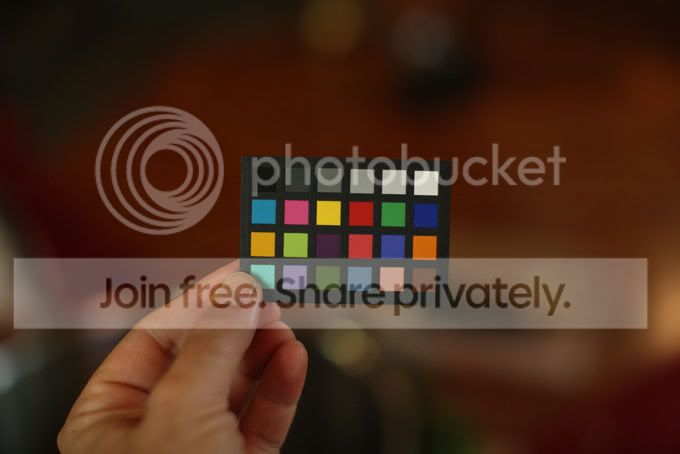
www.dsaphoto.com
A picture is thousand words that takes less than a second while a thousand words is a picture that takes a month.
Nov 2, 2009 at 2:36 am #69262david king
MemberNeal if you are going to try for “color correct images” for on screen viewing yon need to calibrate your monitor and use a 5000k viewing light setup. I shot tens of thousands of images for the carpet industry that were color critical. Profile your system and output your web files as srgb. Everybody has a monitor that is different. Use the MacBeth chart that David shot a picture of for reference set you black to 50-50-50 and the white to 245-245-245 middle gray at 118-118-118. That is a good starting point you will have to adjust for dye anomalies and the extreme color saturation associated with tying materials and how you want to interpret your creations. You can’t be sure what other people see but you can control what your file looks like and have confidence that it is correct if you control your setup for web images.
Do not shoot directly into srgb because the color space is very small.
Use adobe rgb for color correction and output to srgb for the web.Your images look very good on my MacBook Pro screen and my second monitor attached to the MacBook Pro but they are both different. I’m running Snow Leopard. If you use the numbers on the chart as a neutral starting point you know you are close. If you want to get real serious you can buy software and hardware from Macbeth/ X-rite to calibrate your monitor and output devices.
Nov 3, 2009 at 3:01 pm #69263 Ben CochranMember
Good stuff David! I know that Neal already has the EyeOne 2 and calibrates on a regular bases and uses both his Uni Body and Cinema Display. i will add that the cs4 ACR does a great job of white point and black point adjustments, for white balancing. Off of the card, the white balance may go a bit over the 245 sweep but does not hit the 255 “no ink” zone. I do agree with dialing in the 245 sweep as that will provide enough ink to paint the 18% grey on many media types.
I do have a question for you though. What are your thoughts about Snow Leopard? I know that it takes far greater use of the graphic cards but the increased brightness kind of makes me nervous. I proof on a R2400 but this is notorious for printing dark. I am using Snow Leopard but Apple has not been able to answer my question’s about how it makes better use of the gamut; is it absolute of perceptual?
Nov 3, 2009 at 11:00 pm #69264MemberDavid and David – I too like the X-rite ColorChecker mini card! It is invaluable for small product fly shots. I mostly use it for white balance and black point correction and the per-shoot batch processing is a snap in ACR or Lightroom (under RAW of course). David King, that sounds like a major project shooting carpet or any such project where color is critical, good tips.
Ben really hits the point I was after when he asks the question about Snow Leopard. I too have noticed a significant brightness change in my 24″ Cinema Display since upgrading. The internet chatter is not leading to a solid conclusion but there is certainly an improvement in the graphic card relationship with the monitor. This is great but has me rethinking how to process pictures for the web (i.e. final conversion to sRGB at 72dpi but I might need to tweak the brightness before sending to SmugMug). BTW, my prints are spot on after the upgrade – so this appears to be an issue with brightness in relation to web viewing only.
Example – My bluegill warmater fly box with the min ColorChecker card in ambient light. Great little tool.

Corrected

Uncorrected
 Nov 4, 2009 at 2:01 am #69265Member
The great thing about using the chart is that you have a consistent starting point but I have had the chart read dead neural and the color of fabric or yarn be off sometimes quite a bit. Subtle nuanced colors suffer most as well yarns and feathers that can bend light through their fibers. You can usually get the color right in PS though.
Ben I have noticed that my second monitor has been behaving strangely since I upgraded to to Snow Leopard. Upon waking up from standby the monitor comes back on light and blue and I have to reselect the profile in system preferences.
I would think gamut would be mostly dependent on the monitor. If you have a high end monitor that displays 95% of Adobe RGB and it is calibrated and you have a good stable viewing setup you are in a good position. I haven’t heard anything about Snow Leopard as far as perceptual or absolute gamut. There are so many factors in color management at capture, during editing and output. It is easy to miss a setting especially if you have multiple output scenarios.I once had 5 different experienced Pre-press Techs correct the same set of files and originals on the same system. Each result was slightly different! Even with all the tools we have now it comes down to a person looking at the image and saying yes thats the color.
Neal your images are exceptional! You could easily shoot jewelry. Thats one of the most difficult subjects I’ve ever shot commercially.
Nov 5, 2009 at 8:31 pm #69266anonymous
MemberPics look great on my PC/CRT Neal.
Out of curiousity what is the advantage of the color card over a simple gray card. Wouldn’t color correcting the reference gray card image give the same result or do you use the color card differently. I was just insurance documenting my pipe collection and used a gray card reference.

 Nov 6, 2009 at 2:15 am #69267Member
Will you would be balanced for 18% neutral grey but you wouldn’t know where your white balance was or your deep shadow. I would be more concerned with a white balance that kept the highlights controlled unless you wanted to blow them out as in your pipe shots.
Nov 6, 2009 at 2:47 am #69268MemberFirst off Will – ANYONE who documents a their pipe collection is good people. That is cool.
Second, I agree with David – the card is valuable on many levels. Honestly, it just looks professional and sometimes is probably more of a gimmick. However, the gradation of values is the primary interest. For example in ACR you can manually profile your white point, black point and grey point and then apply that to all the per-session shots under similar lighting. The color squares are good for spot calibrating hue and saturation. For example, under my particular macro studio setup the green channel tends to blow out and using ACR I can custom correct hue/saturation for the greens with the card. If you look at my bluegill box above you will see that the uncorrected photograph shows the off green and the corrected photograph shows a true green/chartreuse in the marabou.
The ColorChecker card is most valuable when doing prints.
Nov 6, 2009 at 2:53 am #69269MemberHi David
Yep I blew out the background a bit – but after the gray card WB correction. So that would be a curves/levels issue not a WB one? No?
Bear with me I’m seriously clueless here-
Nov 6, 2009 at 3:00 am #69270MemberTy Neal
I think I see what you are getting at- your just way to subtle for this simple guy:)).
Your reference to hue/sat/ and the color card use makes sense and that was my query:)))
someday I will learn this subtle stuff:))))
Will
Nov 6, 2009 at 4:05 am #69271Ben CochranMemberWill, I hope you don’t mind if I jump in here. A true 18% grey card will reflect all color casts equally and this is what allows for a proper WB as we adjust the hue to 18% grey on the card, that we photographed in with the composition.
I love a good high key shot but in many, especially product photography, there is a strong need to also adjust for the black points. As we mentioned earlier, 255, 255, 255 will not lay down any ink and this means the whites will be dependent upon the paper and fade with it accordingly. Also, high key shots are tricky as they most often want to over expose the subject. If you look at your neat pipes, you may see that the darks are a bit over exposed. By also WBing with your black points, this will help bring more of your contrast back into the subject. If there are no black points, try for a grey tone with a close 18% grey being the best bet.
Nov 6, 2009 at 4:44 am #69272MemberThat’s good stuff Ben, thanks.
Will – you are far from a simple guy, LOL.
Nov 6, 2009 at 5:13 am #69273David AndersonMemberThe advantage of the color card IMHO is not anything to do with the computer and ink levels, but as a quick guide for your eye.
I think it’s possible to train your eye to see a lot of this stuff before it becomes an issue.
I also think it’s the photographers job to get a good clean frame and the printers / graphics peoples job to get it looking good on paper or screen.
We’re robbing ourselves of valuable cafe time by doing their jobs as well.. ;D
www.dsaphoto.com
A picture is thousand words that takes less than a second while a thousand words is a picture that takes a month.
Nov 6, 2009 at 6:30 am #69274Ben CochranMemberI know where you are coming from David but in my case, I learned a very valuable lesson. After having an art department destroy my shots and publish them, I have become a Freudian case study when it comes to having more control of my final output. Those shots were processed and converted to CMYK so badly that I won’t even show them in my book.
I get kind of nervous at the cafe now ;D
-
AuthorPosts
- You must be logged in to reply to this topic.