






Black and white
Blog › Forums › Photography › Black and white
- This topic has 14 replies, 9 voices, and was last updated Jan 13, 2010 at 10:27 pm by
Morsie.
-
AuthorPosts
-
Jan 11, 2010 at 1:21 am #8271
Morsie
MemberGuys I’m tossing around photographing some fly tying sequences for a new book in black in white.
What is the best option – (is there any difference in fact) – shoot in black and white or convert to black and white?
Thanks, Morsie
Jan 11, 2010 at 1:26 am #69907zach vandehey
MemberIf you shoot the photos in RAW then you will have more control over exposure and color. Also with a JPG file you lose quality every single time you save the image and also each time you make edits. A RAW file is like a negative and doesn’t lose quality so you can save a file and convert to BW without losing the original.
Zach
Jan 11, 2010 at 1:59 am #69908 Ben CochranMember
Morsie, I would strongly recommend shooting color, as it will provide you with more control over your targeted gray scales.
Jan 11, 2010 at 2:13 am #69909dusty montgomery
MemberMorsie, I would strongly recommend shooting color, as it will provide you with more control over your targeted gray scales.
Strongly agree with Ben. Then you could open up with some duo, tri, and quad B&W tones in Ps. The more info. the file has to offer the better.
Now, this is all based on the fact that I assume your new 7D does not have some sweet, smokin’ B&W conversion that I do not know about! 🙂
D.
Jan 11, 2010 at 2:54 am #69910MemberDusty it does, I was looking at that this morning and thought I would ask a little first ……… maybe I need to play with that first, so many tools, yet so few fully functioning brain cells left……..
Morsie
Jan 11, 2010 at 3:02 am #69911MemberWell then, I guess that all there is left to do is for you to make some posts and send over some of the brain cell erasers!
Jan 11, 2010 at 3:05 am #69912david king
MemberShoot raw in color and custom convert based on the color in the flies etc. There are some nice plugins that simulate the panchromatic characteristics of films. Nik Silver Efex Pro is really nice.
Jan 11, 2010 at 8:18 pm #69913Douglas Barnes
MemberI agree with Ben & David. Shoot color RAW RGB then convert in PS. You’ll have a lot more control in the end. You can google ‘black and white conversion actions’ or something like that and find several free PS action downloads.
db
Jan 11, 2010 at 9:01 pm #69914MemberThanks Guys.
Morsie
Jan 12, 2010 at 8:38 pm #69915 David AndersonMember
Morsie, when shooting B&W film you had the option of color filtering to change tonal range and contrast.
Red for example, was used to darken skies and make the clouds really stand out, yellow and orange did the same to a lesser extent.
Green was great for skin-tone and foliage.With digital and a raw you can do the same filtering in PS or LR with control that Ansel or Weston would have killed for.
www.dsaphoto.com
A picture is thousand words that takes less than a second while a thousand words is a picture that takes a month.
Jan 12, 2010 at 9:45 pm #69916Neal Osborn
MemberAll good stuff above.
I recently did exactly what you are intending to do Morsie; a B&W fly tying sequence. After much trial and error and research I found two methods most helpful for the specific capture of “fly tying”. Both involve a beginning workflow of capturing in RAW and doing basics edits (white balance, clarity, curves, etc) in Lightroom and batch processing from there in PS (my usual workflow). Then you have two options: 1) convert to B&W and tweaking with selective masking layers via channels, generally the red and blue channel offer the best results, or 2) Silver Effex Pro by Nik Software! In the end, the Silver Effex is flat out amazing, one of the best software add-ons I’ve purchased. I learned that you can add it to Lightroom as a plugin – thus, the workflow would be RAW-LR_tweaks-SE_plugin. The plugin will export all your files to TIFF automatically and put them in a separate window where you can apply the exact same settings and “structure” slider to each photo, at which point the plugin will then magically save them back to LR as separate files. You can process an entire sequence in less than 2 hours. Needless to say, I prefer this method because it is simple, fast, and your images all get the same treatment without having to record an action sequence.
Jan 13, 2010 at 12:57 am #69917anonymous
MemberHi
Out of curiosity why would you want to do a B and W sequence?. Is it a ” look” thing ?? or is the color distracting from the point of the sequence somehow?
Will
Jan 13, 2010 at 2:46 am #69918MemberI have discovered B&W conversion functions in Lightroom and has resolved any issues, just need to get used to it.
In my case why black and white?
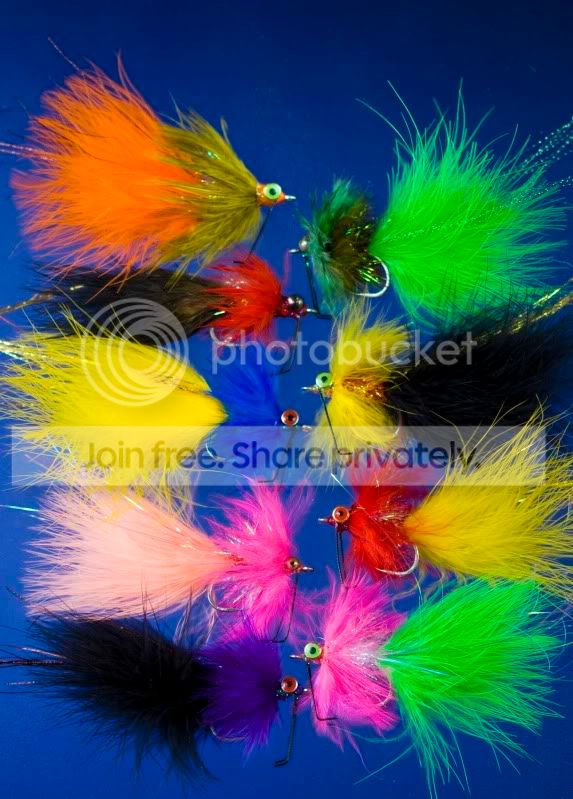
Cost of printing and book layout. This new book has fly tying sequences that I want to run in the appropriate chapters. To print them in place in full colour is expensive – colour images will be confined to plates printed in blocks and there will be plenty of them, I have to edit more than 700 back to 70 ffs. I also want the tying sequences to be in B&W so tiers aren’t distracted by all the colour there is in some of these flies, I want them to focus on the pattern and the method, not the colour – if that makes sense.
Its an interesting exercise, certainly a lot different from shooting outdoors in mostly natural light.
Morsie
Jan 13, 2010 at 10:25 am #69919David AndersonMemberIMHO, Tying sequences in B&W would be fine as long as there’s a color reference shot of the flies at some point.
Awesome looking cod flies Morsie..
It was 103 deg. here today before the storm hit – felt very much like cod weather.. 😉
www.dsaphoto.com
A picture is thousand words that takes less than a second while a thousand words is a picture that takes a month.
Jan 13, 2010 at 10:27 pm #69920MemberPlenty of reference to colours and possible combinations with colour plates Dave, just the tying sequences in B&W so they can be included in the right place.
Morsie
-
AuthorPosts
- You must be logged in to reply to this topic.