Lately, I’ve been messing around a bit with my point-and-shoot underwater digital camera, taking some pictures of trout and other stuff. I don’t consider myself a serious “photographer” by any means – I’m just having a little fun.
Anyway, I’d like to get a little feedback on doing some “post-production improvements” with photoshop. The following picture is a good example. I liked the picture, but there was a big flaw – a spot of mud on the lens caused a blur in the upper right hand corner. I don’t intend to do anything “serious” with the picture, but I wanted to conceal the flaw so it wouldn’t be noticed easily if I e-mailed the pic around to friends or put it on the web somewhere. Basically, I used cut-and-paste and the clone tool to patch some stream gravel over the blur. I didn’t spend a whole lot of time or go pixel-by-pixel or anything – it was a pretty quick fix.
I actually did this with Corel Photohouse rather than true Photoshop – since that’s what I have on my computer. The programs are about the same; the main thing Corel lacks is a “smudge tool” to smooth out cut-and-paste lines. You have to use the clone tool and a careful selection of brushes to do that.
Anyway, enough talk. Here’s the “before,” which has only been resized to fit the screen, and the “after,” which has the aforementioned fix plus a bump-up in color and contrast. I’d be interested in any suggestions of things I could have done better (without spending hours on the pic) or things I missed.
Before:
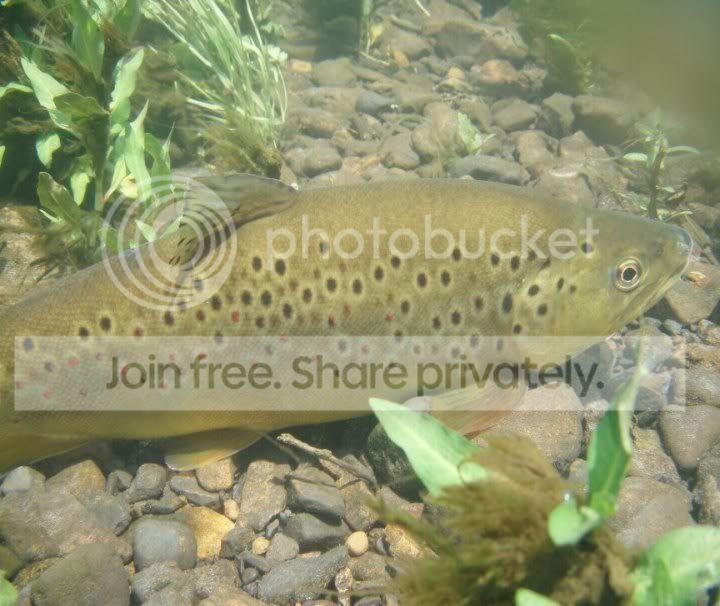
and After:
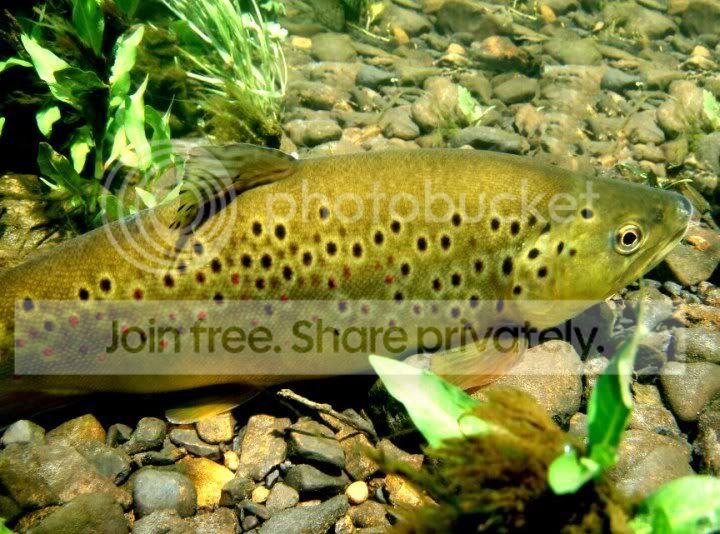
Thoughts?
bd







.


